Edit many lanes at once
Last updated: October 18, 2026
In a big batch, select the lanes you want and change them together instead of one by one.
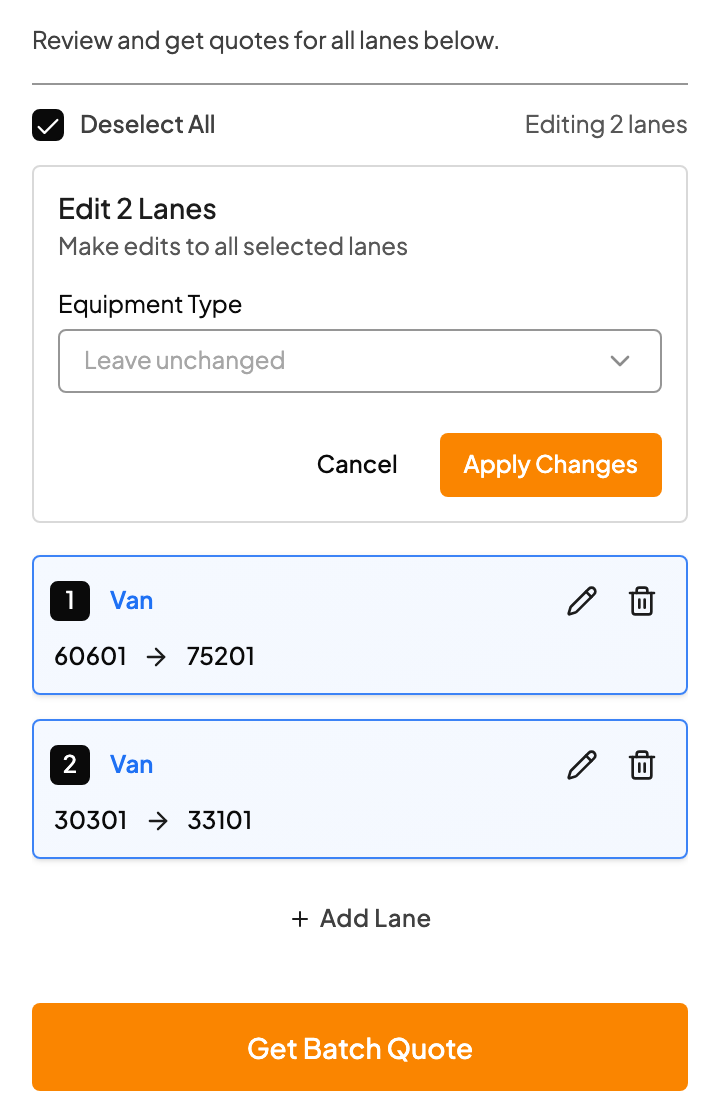
Before you price: fix equipment
- Tick the box on each lane you want to change, or tick Select All.
- Click Edit Selected.
- Choose the Equipment Type, for when the customer wrote "reefer" once at the top and meant it for every lane.
- Click Apply Changes.
Set equipment before you click Get Batch Quote. Once lanes are priced, bulk edit switches to pricing options.
After you price: adjust pricing together
Once the batch is priced, select lanes and click Edit Selected again to change, for all of them at once:
- Your margin
- The rate source
- The Price Format: Flat, Per Mile, Flat & Per Mile, or Linehaul
One lane at a time
- Click the pencil icon on a lane to change its equipment, pick or drop.
- Click the trash icon to remove a lane you're not quoting.
- Click Add Lane to add one Kit missed.
Related